Closed kernel
Values, instructions, declarations, and regions form the finite semantic core.
Agent Intermediate Representation
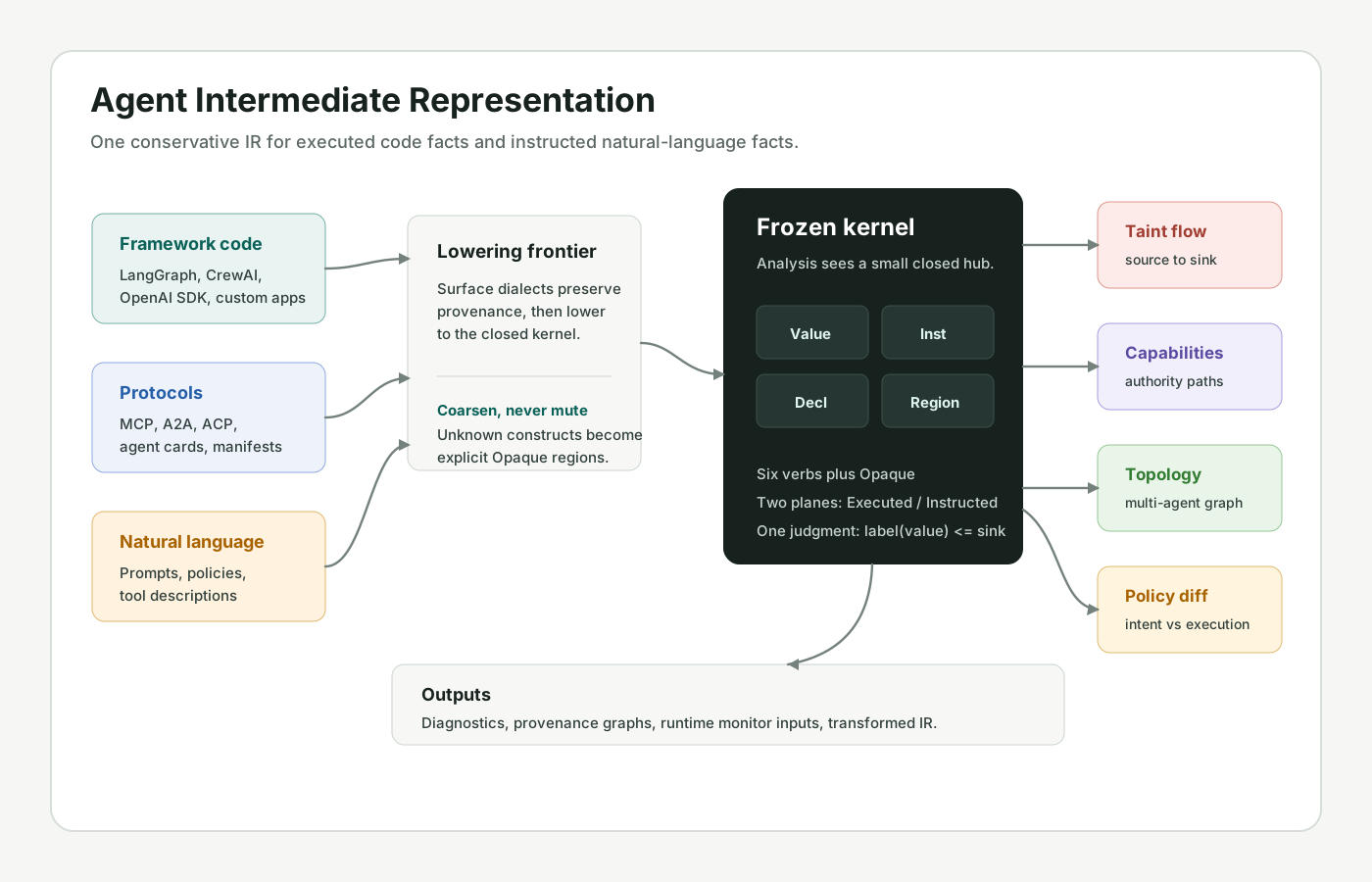
AIR models LLM-based agent systems before deployment. It lowers framework code and natural-language instructions into one conservative representation so static passes can check dataflow, authority, topology, and policy intent.
Principles
Host code executes. Natural language instructs. AIR keeps both visible, typed, labeled, and separated so analyses can compare what the system does against what it claims.
Values, instructions, declarations, and regions form the finite semantic core.
Executed facts and instructed facts remain structurally separate.
Every external position declares the label it is allowed to receive.
Unsupported constructs lower to conservative Opaque facts, not silence.
AIR deliberately avoids an open operation registry for the analysis core. New frameworks attach dialect metadata and lowering patterns, but every security pass sees the same finite kernel.
Architecture
AIR is not a runtime and not an agent framework. It is a compiler-style analysis target placed between source artifacts and diagnostics, monitor inputs, or provenance outputs.
Framework and protocol frontends collect graph flow, tools, prompts, state, cards, and manifests.
Known constructs become kernel ops; unknown constructs become explicit Opaque regions or ops.
Passes run over labels, regions, capabilities, topology, memory, channels, and policy planes.
Findings point to represented IR facts rather than runtime traces or prompt-only heuristics.
IR Model
AIR reduces diverse agent behavior to six verbs plus Opaque. Analyses do not need to know whether a construct came from LangGraph, MCP, A2A, ACP, or a custom runtime.
air.module @support_bot {
air.agent.func @triage(%msg: !air.text) -> !air.text {
air.region @body Body fidelity = Executed {
^entry(%msg: !air.text):
%policy = air.acquire.load @privacy_policy
%ctx = air.compose.messages [%policy, %msg]
%plan = air.consult.infer model = "model-router" intent = Plan(%ctx)
%ticket = air.act.tool_call @crm_create_ticket(%plan)
air.return %ticket
}
air.region @intent InstructedProcess fidelity = Instructed {
// lifted policy facts remain advisory, then checked
// against the executed region.
}
}
}
label(value) <= required(position)
Confidentiality, integrity, persistence, and curation move through the same dataflow machinery for code-derived and prose-derived facts.
Security Research Surface
AIR findings are grounded in represented flows and declarations: where values come from, which region carries them, which agent receives them, and which sink prices them.
Track untrusted, private, persistent, and model-curated values into tools, egress, state, and memory.
Expose confused-deputy chains and unused high-risk grants across tools and delegated agents.
Find dead agents, rogue participants, unsafe dynamic edges, and cyclic delegation with missing budgets.
Compare lifted natural-language policy with executed code facts without treating prose as enforcement.
| Code | Finding | IR evidence | Why AIR can represent it |
|---|---|---|---|
| S8101 | DeadAgent | Declared agent unreachable from entries, topology, handoff, spawn, or cards. | Agents and edges are first-class module facts. |
| S8201 | AgentLoopDoS | Delegation cycle lacks finite iteration, model-call, or wall-clock budget. | Regions, topology, and budgets share one graph. |
| S8202 | ModelCallAmplification | Model call appears inside natural loop or recursive region without tight budget. | RegionFlow and dominance make loop-contained calls visible. |
| S8302 | DynamicToolSupplyChain | Dynamic tool origin lacks provenance, schema, trust policy, or allowlist. | Tool declarations are priced authority surfaces, not comments. |
Frontends
Dialects preserve provenance and round-trip metadata, but they do not change kernel semantics. That is the boundary that lets new ecosystems join without weakening old analyses.
StateGraph flow, nodes, conditional edges, tools, prompts, state schemas.
Server manifests, tool schemas, resources, prompts, sampling surfaces.
Agent cards, skills, task calls, streaming subscriptions, external claims.
Sessions, subagents, streaming updates, task lifecycle, protocol contracts.
Agent roles, tasks, crews, hierarchical delegation, tool grants.
Planner/executor structure, dynamic tool and policy surfaces.
Project
The implementation is a Rust workspace with a closed kernel, textual AIR format, analyses, driver pipelines, and frontend crates. For research and security contact, email security@centaurisk.ai.
cargo check --workspace
cargo test --workspace --lib --bins --tests --no-fail-fast
cargo run -p air-driver --bin air-check -- path/to/module.air